Backseat Rally is a Roblox rally-driving game built around a clear loop: choose a role and car, enter a stage, follow the co-driver's calls, finish through the checkpoints, then use the result to practice, upgrade, or try again. This wiki guide is for a first session rather than a complete vehicle or stage catalog. It focuses on the actions that determine whether a new run starts correctly and how to recover when it does not.
Start with Drive, Play, and Drive
From the main menu, select Drive, then Play, and then Drive again to reach the driving setup. Choose a Co-driver before selecting a vehicle and stage. The co-driver can be an AI, an invited friend, or an empty seat. For a first attempt, AI is the simplest way to hear the call system without coordinating another player.
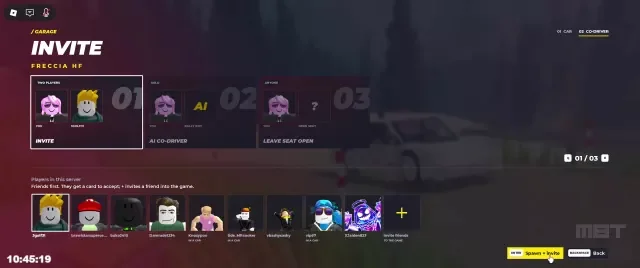
You can also choose Free Roam when the goal is to learn the car rather than record a stage time. Free Roam is useful for testing steering, braking, handbrake behavior, drifting, visibility in rain or snow, and the feel of a route before committing to a Rally Stage. It is practice, not a replacement for the start-box procedure used by a timed run.
The first menu choice also determines what kind of help you need. A solo player can use AI to make the co-driver system available immediately. A group can invite a friend to the second seat and divide the work between reading calls and driving. Leaving the seat empty removes that source of advance information, so it is a deliberate practice choice rather than a faster version of the normal rally setup.
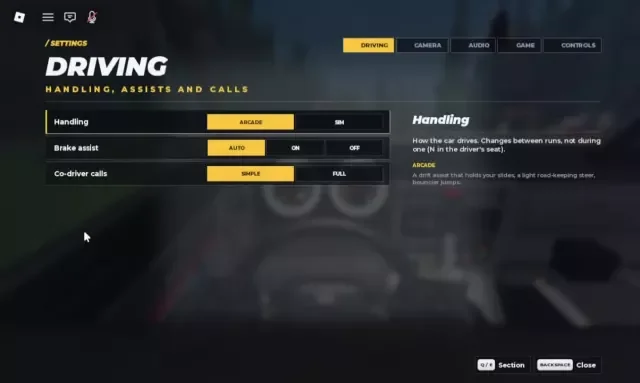
Before launching a serious attempt, check the driving settings. Handling, Brake Assist, and Co-driver Calls can be adjusted there. Keep the assistance that helps you read the road while learning, then change one setting at a time so you know which change affected the car.
Know the Driver and Co-driver jobs
The Driver controls acceleration, steering, braking, handbrake use, and the vehicle's line. The Co-driver gives advance information about bends, jumps, water, and danger. These jobs work together: the call is an early warning, while the driver decides how much speed the current surface and car can safely carry.
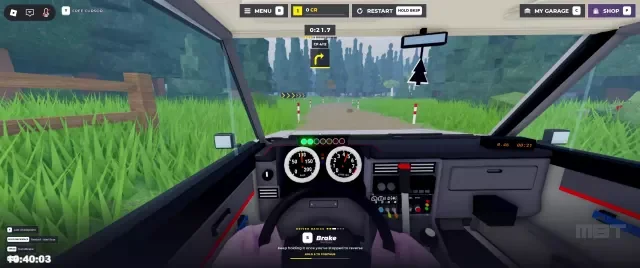
Treat calls as priorities rather than commands to make a fixed input. A Slight Left or Slight Right normally needs only a controlled speed adjustment. A Hard Left or Hard Right needs earlier braking and a slower entry; trying to turn at full speed and correcting late is more likely to push the car wide. A jump commonly calls for keeping the throttle steady, while a danger warning means leaving room to correct after the obstacle.
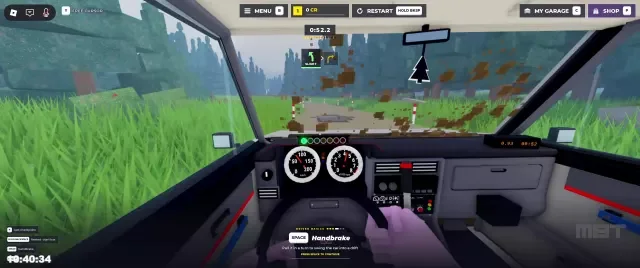
The handbrake can help with a tight turn or a controlled drift, but holding it too long can remove the grip you need to exit the corner. New drivers should first learn a normal brake-and-turn line, then add short handbrake inputs when a stage or surface makes them useful. If calls never appear, first verify that the co-driver is selected and that the stage has been started from the correct box.
Match cars and parts to the road
Backseat Rally stages can involve Tarmac, Gravel, Dirt, Snow, Forest, or Riverbed conditions. Surface and weather change the grip available to the tyres and the amount of time you have to brake. Rain and poor visibility can also make the road harder to read, so windscreen wipers matter when the view is obscured.
Use My Garage to select, paint, customize, and upgrade a vehicle. Performance parts cover the engine, turbo, exhaust, gearbox, suspension, tyres, brakes, and drivetrain. The useful choice is not simply the part with the largest-looking performance change: tyres, suspension, and brakes can matter more when the route is loose, uneven, or full of late braking points. The game evidence does not provide a complete car list or every unlock threshold, so treat the garage as a place to test combinations rather than assuming one universal best build.
The same principle applies to route selection. Pine Forest, Alpine Pass, and Sakura Pass are examples of stages with different terrain or weather demands. A car that feels predictable on Tarmac may need a different approach on Gravel, Snow, or Riverbed. Record what caused the mistake—late braking, wheelspin, poor visibility, or a missed call—before changing several parts at once.
For a first stage, choose a setup you can control consistently. If the car slides before you can react, reduce the demands on your line and use Free Roam to test braking. If it feels stable but slow on exits, practice getting back on the throttle after the apex before spending CR on parts.
Enter the Start Box and launch the stage
After choosing a car and stage, drive to the marked Start Box. Stop the car with the brake inside the box. The important checkpoint is the START STAGE prompt: it confirms that the game has recognized the starting position. Press Enter only after that prompt appears, then wait through the countdown for the green GO signal.
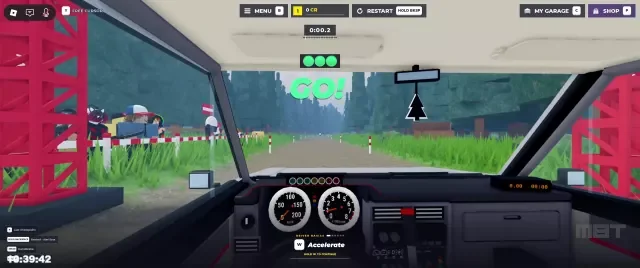
This sequence is part of the gameplay, not decoration. Starting from the wrong place can prevent normal timing or co-driver calls. If the screen says MISSED THE START BOX, press R to return and set up the start again instead of trying to continue from an invalid launch.
At the green signal, accelerate smoothly and listen for the first call. Do not spend the opening seconds searching menus or changing settings. If the car moves before the signal, or if the call system is silent, stop the run at the next safe opportunity and check the start-box state before retrying. A clean launch gives you a reliable reference for comparing later attempts.
Drive through calls, surfaces, and checkpoints
Once the stage begins, look far enough ahead to combine the call with the road you can actually see. Brake before a hard bend, turn progressively, and let the car settle before accelerating out. Keep a margin after a jump or danger call; a fast entry is not useful if the landing leaves you facing the wrong way. On snow, dirt, gravel, or riverbed sections, make smaller steering corrections and expect braking distance to change.
Use the vehicle's controls for the conditions rather than trying to force a single technique everywhere. Normal braking is the baseline. The handbrake is an occasional correction or drift aid. Windscreen wipers help preserve visibility in wet conditions. If a surface repeatedly causes a spin, return to Free Roam, test the same type of turn, and adjust the car or your entry speed before using another timed attempt.
Practice Backseat Rally calls, setups, and visibility
These linked moments support the guide's advice on matching garage parts to the car, reacting to co-driver calls, and using Free Roam to practice in poor visibility.

Follow the route through its checkpoints and keep driving until the stage completion result appears. A finished run produces a time and a medal result—Gold, Silver, or Bronze. That result is the verification checkpoint for the attempt. You can then watch a Replay, choose Retry to improve the time, and in some start panels switch a Ghost for comparison.
Turn results into the next attempt
After a completed stage, separate the rewards and progress systems. Medals describe the stage result. CR is used for vehicles, appearance, and performance parts, and can come from stages, Contracts, and reward objectives. XP advances level progress and may contribute to unlocking vehicles or content. These are related to the same activity but are not interchangeable, and a With VIP value shown in a reward screen is an extra value rather than a reason to count the entire payout twice.
Open Contracts when you want an objective to pursue alongside practice or racing. Use the route result to decide what to do next: Retry if the line was sound but the time was slow, Free Roam if control or visibility caused the mistake, Garage if the road exposed a setup problem, or a different stage if you need to learn another surface. Multiplayer Race adds Host or Join choices, a co-driver seat, and room settings; start with Solo Stage until the launch and call rhythm is familiar.
Multiplayer settings can affect how a session feels, but the available reference does not establish every final default. On supported Pine Forest multiplayer races, the host can encounter choices involving access, collisions, racer count, and vehicle-level limits. Check those values in the room instead of assuming they match a solo stage. The important beginner checkpoint is still the same: every participant should know whether the session is waiting for a start box, a countdown, or a replay/retry decision.
The most useful progression is a repeatable one: practice the route, make a valid start, finish without losing control, inspect the time and medal, then change one driving or garage decision before trying again. The available evidence does not establish a complete controls chart, full vehicle roster, every medal threshold, or final defaults for every multiplayer option, so those details should be confirmed in-game rather than guessed from a partial list.
Backseat Rally FAQ
Why are my co-driver calls missing?
Confirm that you selected an AI or player co-driver, then restart the stage from the Start Box. The game must recognize the box and show START STAGE; an invalid start can prevent the normal call flow.
What should I do after seeing “MISSED THE START BOX”?
Press R to return, drive into the marked Start Box, and brake to a stop. Wait for START STAGE, press Enter, and then wait for the green GO signal before accelerating.
Should I use Free Roam or Retry to improve?
Use Retry when you understand the route and want another timed attempt. Use Free Roam when you need to test braking, drifting, visibility, or a vehicle setup without focusing on a stage result.